Lunagraph Screen Capture converts live web UI into editable code
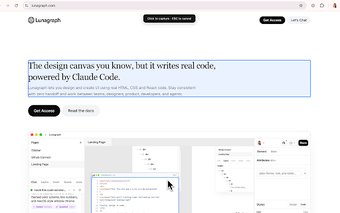
Lunagraph Screen Capture by Lunagraph is a Chrome extension that captures live web interfaces for design iteration. It extracts DOM elements and visible page content, preserving computed styles and structure so designers and developers can reuse real code. Key capabilities include an element picker, React component detection, and copy-to-clipboard output. The tool is aimed at UI/UX designers, front-end engineers, and product founders who want to shorten the rebuild cycle when iterating on existing pages.
What does the extension extract from a webpage?
The extension targets page structure rather than pixels: you can select a specific DOM element with an element picker or capture the entire visible screen. Instead of producing a bitmap screenshot, it scrapes the page's DOM and the page's computed styles so the captured output reflects actual markup and styling. This approach helps avoid manual re-creation of layout or typography when inspecting live interfaces.
How accurately does it reproduce live UI for development workflows?
The tool preserves computed CSS and DOM structure and outputs HTML, CSS and React component fragments, which supports code-based iteration. It includes optional React component detection for local development and copies captured content to the clipboard for transfer. That fidelity makes the captured fragments suitable as a starting point for redesigns or component refactors when teams prefer a code-first workflow.
Does it limit background tracking or consume extra resources?
The extension activates only when you click it to perform a capture and does not run background monitoring, inject ads, or track search results. The source notes the extension is lightweight, and it is available for Chrome and other Chromium-based browsers, which keeps platform reach consistent with common desktop setups. Those behaviours reduce persistent background activity compared with always-on add-ons.
Who benefits most and what workflow constraints apply?
The extension is aimed at UI/UX designers, front-end developers, and product founders who use Lunagraph's design canvas to iterate on interfaces. Captured output is copied to the clipboard and is specifically designed to be pasted into the Lunagraph editor, so teams that already use that editor gain the most immediate benefit. Teams that rely on other design tools may find integration requires additional steps.
A practical choice for teams committed to a code-first design workflow
Given Lunagraph's focus on a design canvas that represents visual elements as real code and the extension's positive niche reception, the tool is a practical option for teams aligned with that approach. A quick pilot capture of a single component is a useful test before wider adoption. The extension suits teams seeking to reduce manual rebuilding of interfaces while acknowledging ecosystem lock-in as a trade-off.